
Google Veo 3.1 Update: Vertical Video, 4K Quality, and Major Consistency Improvements
⏱ 5 min read
In this article
- Introduction
- Google Announces a Major Veo 3.1 Update
- Improvements to Veo 3.1 Ingredients to Video
- Maintain Identity Consistency for Characters
- Achieve Background and Object Consistency
- Seamlessly Blend Textures, Characters, and Objects
- Pro Tip: Use Nano Banana Pro for Ingredient Images
- Native Vertical Video Output (9:16 Aspect Ratio)
- State-of-the-Art Upscaling to 1080p and 4K
- Where You Can Try Veo 3.1 Today
- Video Verification with SynthID
- Conclusion: Why the Google Veo 3.1 Update Matters
- What this means for solopreneurs
Introduction
The Google Veo 3.1 update marks a major leap forward in AI-generated video creation. With native 9:16 vertical video support, dramatically improved consistency, and up to 4K resolution, Veo 3.1 is now optimized for both mobile creators and professional production workflows.
Even with shorter prompts, the model can better understand intent and deliver expressive, high-quality results. These new capabilities are now available across the Gemini app, Flow, YouTube, Google Vids, and APIs, expanding creative possibilities for everyone from casual storytellers to professional filmmakers.
Google Announces a Major Veo 3.1 Update

Google has officially rolled out a large-scale update to Veo 3.1, focusing on expressiveness, video quality, and mobile-first creation. According to Google, the goal of this release is to help users create more fun, creative, and high-fidelity videos—especially when working from reference or “ingredient” images.
The update is designed to serve a wide range of creators, from everyday users experimenting with AI video to professional filmmakers building broadcast-ready content.
Improvements to Veo 3.1 Ingredients to Video
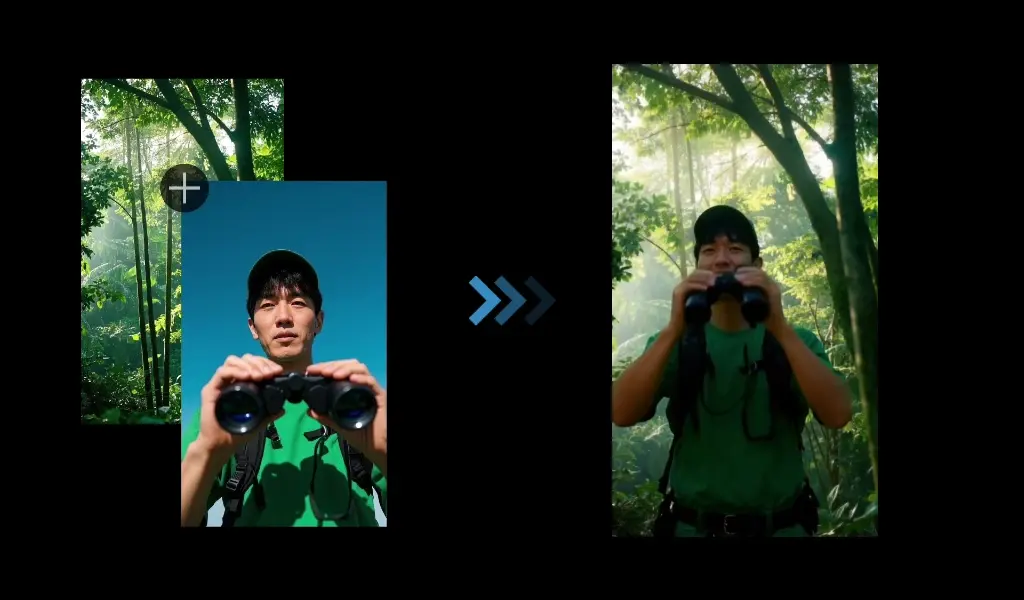
The Ingredients to Video feature in Veo 3.1 has received substantial upgrades. This capability allows users to generate videos directly from reference images, and it now produces far more expressive and creative results—even with simple, short prompts.
Videos generated with this update feature livelier motion, richer storytelling, and more natural visual transitions, making short clips feel more dynamic and engaging.
Maintain Identity Consistency for Characters
One of the most notable improvements in the Google Veo 3.1 update is enhanced identity consistency. Characters now maintain the same appearance across multiple scenes, even when environments or camera angles change.
This makes it significantly easier to tell longer narratives and build cohesive stories where the same character appears throughout an entire video sequence.
Achieve Background and Object Consistency
Veo 3.1 also improves control over backgrounds, objects, and textures. Users can now reuse specific objects, environments, or visual elements across scenes without losing visual integrity.
This enhancement is especially valuable for creators who want a unified aesthetic or need continuity between different shots in a single project.
Seamlessly Blend Textures, Characters, and Objects
The updated model excels at blending disparate elements—such as characters, props, textures, and stylized backgrounds—into a cohesive final clip.
Rather than feeling stitched together, videos now appear more unified and visually polished, even when combining very different visual components.
Pro Tip: Use Nano Banana Pro for Ingredient Images


For best results, Google recommends creating ingredient images using Nano Banana Pro (Gemini 3 Pro Image) inside the Gemini app or Flow, then feeding those images into Veo 3.1 Ingredients to Video.
This workflow helps produce cleaner inputs and more visually striking final videos.
Native Vertical Video Output (9:16 Aspect Ratio)

For the first time, Ingredients to Video supports native 9:16 portrait output. This update eliminates the need for cropping or resizing and is ideal for mobile-first platforms like YouTube Shorts.
Creators can now generate full-screen vertical videos that retain maximum quality and visual clarity.
State-of-the-Art Upscaling to 1080p and 4K
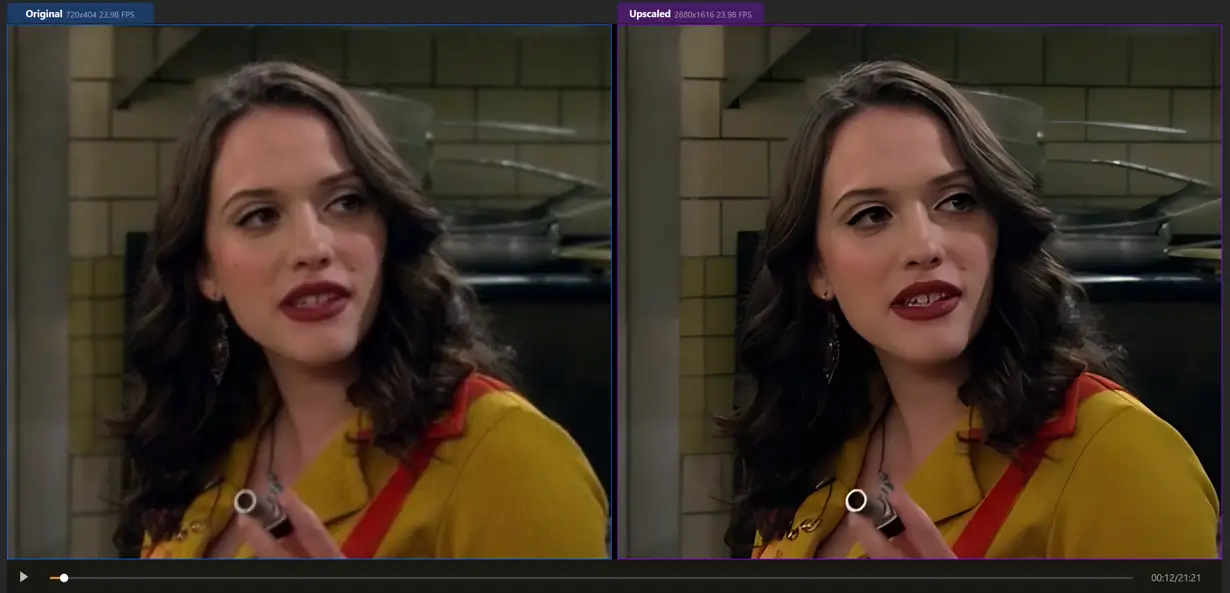

The Google Veo 3.1 update introduces state-of-the-art upscaling to both 1080p and 4K resolution.
- 1080p offers sharper, cleaner visuals ideal for editing workflows.
- 4K delivers rich textures and exceptional clarity, suitable for high-end productions and large displays.
These options make Veo 3.1 viable for professional and enterprise-level video creation.
Where You Can Try Veo 3.1 Today
The new Veo 3.1 capabilities are now rolling out across multiple Google platforms:
- Consumers & Creators: Available in the Gemini app, YouTube Shorts, and the YouTube Create app
- Professional & Enterprise Users: Rolling out to Flow, the Gemini API, Vertex AI, and Google Vids, with 1080p and 4K support
This broad availability ensures Veo 3.1 fits a wide range of creative workflows.
Reverse prompting allows creators to analyze AI-generated results first and then refine prompts backward, making it easier to achieve consistent, high-quality video outputs with Veo 3.1.
Video Verification with SynthID
To promote transparency, all videos generated with Google’s tools now include an imperceptible SynthID digital watermark.
In the Gemini app, users can upload a video and ask whether it was generated using Google AI, extending Google’s existing image verification tools to video content.
This initiative helps build trust and clarity in an increasingly AI-driven content ecosystem.
Conclusion: Why the Google Veo 3.1 Update Matters
The Google Veo 3.1 update significantly raises the bar for AI video generation. With vertical video support, improved consistency, and professional-grade 4K quality, Veo is now equally powerful for social media creators and enterprise teams.
If you’re looking to create expressive, mobile-ready, and high-fidelity AI videos with minimal prompting, Veo 3.1 is one of the most advanced tools available today.
Now is the perfect time to try Veo 3.1 and explore what next-generation AI video creation can do for your workflow.
What this means for solopreneurs
For solopreneurs focused on content creation, Google Veo 3.1 offers a chance to elevate video production quality without investing in expensive equipment. Start by experimenting with the vertical video feature for social media platforms, but be prepared for a steep learning curve in mastering new workflows like the Ingredients to Video. If your business does not rely heavily on video content, the time and effort to integrate this update might not be justified. Consider whether the improved quality aligns with your brand’s needs and whether it translates into measurable engagement or sales.
Related on RealifeAI


